See it in action
One window. All your documents. Any AI.
Search that understands meaning, previews on the spot, and a chat that answers from your own files.
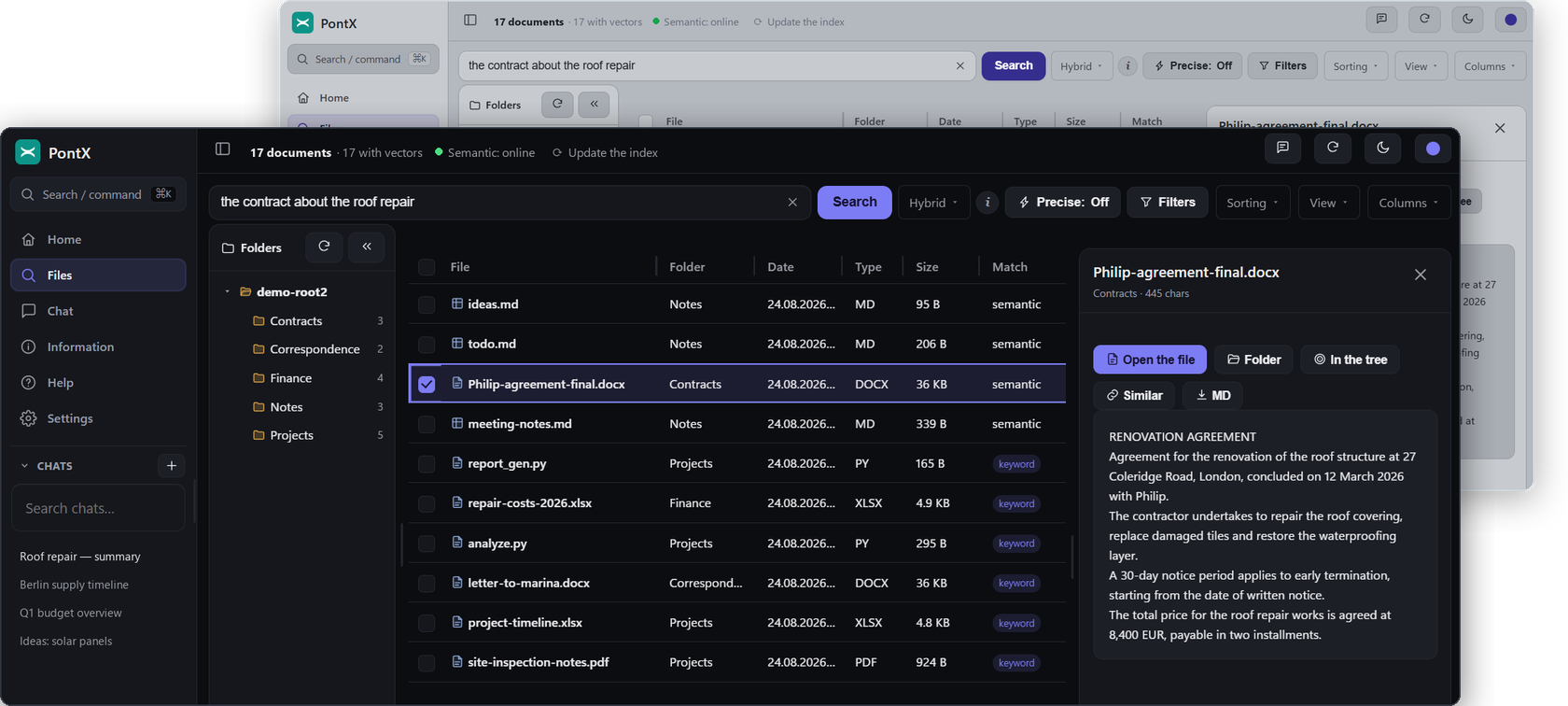
Real screenshots — dark & light theme, semantic search over sample files.
The local-first indexer that connects your documents — Word, Excel, PDF, Markdown, even code — directly to Claude, Gemini, ChatGPT, or a local AI via MCP.
Full product, 30 days. Your files never leave your computer.
Years of contracts, spreadsheets, and reports sit in folders no chatbot can see — and pasting files into a chat window one by one is not a workflow. PontX builds a private index of your documents on your own machine, then hands your AI a map: it can find the right file and read it, right where it lives.
PontX reads your Word, Excel, PDF, and text files and builds a search index — entirely on your computer. Nothing is uploaded.
Find documents by exact words or by meaning — "the contract about the roof repair" works even if no file says those words. Full-text and semantic search, side by side.
Claude, Gemini, or ChatGPT connects to your index through MCP and can find and read your documents when you ask it to — read-only, always.
Search that understands meaning, previews on the spot, and a chat that answers from your own files.
Real screenshots — dark & light theme, semantic search over sample files.
Most "AI for your files" products want your files. PontX is built the other way around: the index lives with the documents — on your machine — and we run no cloud that could read either.
PontX includes a chat that answers from your documents. Point it at a local AI — Ollama or LM Studio — and everything stays on your machine: the files, the question, and the answer. No API key, no account with anyone, no per-token bills. For many everyday questions, a local model is all you need.
* Cloud models inside the built-in chat (Claude, ChatGPT, Gemini, and more) are in development. The MCP connection to Claude, Gemini, and ChatGPT — the bridge above — is available today.
With Anywhere, Claude on your phone or at claude.ai can reach your index through a secure, end-to-end encrypted tunnel — while every document stays exactly where it is: on your computer. And with web access, you can browse and search your files from any browser too, served by your own machine — never a copy in anyone's cloud.
Against the three usual ways people get AI to see their files.
| PontX | Uploading to a cloud AI | Classic desktop search | DIY scripts & MCP servers | |
|---|---|---|---|---|
| Files stay on your machine | Yes | No — uploaded | Yes | Yes |
| Finds by meaning, not just keywords | Yes | Per upload | No | If you build it |
| Works with Claude, Gemini & ChatGPT | Yes — via MCP | One vendor at a time | No | Manual setup each |
| Works with a local AI | Yes | No | No | If you build it |
| Read-only by design | Yes | — | — | Depends |
| Encrypted index on disk | Yes | — | No | No |
| No technical skills needed | Yes | Yes | Yes | No |
Claude, ChatGPT, Gemini, and more inside the PontX chat — with your own key.
Send chat answers into your vault as notes, and send notes to the chat.
No dates promised — and nothing here is sold before it ships.
Try everything free for 30 days — the complete product, not a demo.
Prices include VAT. Cancel anytime from your account. 30-day trial is the full product, tied to your account.
On your computer. PontX indexes your documents locally and stores the index on your own disk, encrypted with your password. We operate no cloud storage for your files — there is nothing on our side to breach.
Only what it asks for, only when you've connected it, and only read-only: it can search your index and read matching documents through MCP. It cannot write, modify, or delete anything.
No. You pick your folders in a setup wizard, PontX does the rest. Connecting an AI is a guided step with copy-paste instructions.
Word, Excel, PDF, Markdown, and plain-text formats — plus source code files, if you switch them on. One honest caveat: scanned PDFs without a text layer can be found by name, but their contents can't be read — PontX doesn't do OCR, and won't pretend to.
Yes. Use the built-in chat with a local AI (Ollama or LM Studio) and nothing leaves your computer — not the files, not the questions, not the answers. Connecting a cloud AI like Claude is optional, and even then only what the AI asks for is read, never your whole archive.
Windows today, from the Microsoft Store. macOS is planned after the Windows launch.